V-model is the basis of structured testing

V-model is the basis of structured testing

You will find out this is a great model!

V-model is the basis of structured testing

  • The left side shows the classic software life cycle & Right side shows the verification and validation for Each Phase

Analyze User requirements
End users express their whish for a solution for one or more problems they have. In testing you have to start preparation of your user tests at this moment!

You should do test preparation sessions with your acceptance testers. Ask them what cases they want to test. It might help you to find good test cases if you interview end users about the every day cases they work on. Ask them for difficulties they meet in every days work now.

Give feedback about the results of this preparation (hand the list of real life cases, the questions) to the analyst team. Or even better, invite the analyst team to the test preparation sessions. They will learn a lot!

System requirements
One or more analysts interview end users and other parties to find out what is really wanted. They
write down what they found out and usually this is reviewed by Development/Technical Team, end users and third parties.
In testing you can start now by breaking the analyses down into ‘features to test‘. One ‘feature to test’ can only have 2 answers: ‘pass’ or ‘fail’. One analysis document will have a number of features to test. Later this will be extremely useful in your quality reporting!

Look for inconsistency and things you don’t understand in the analysis documents. There’s a good chance that if you don’t understand it, neither will the developers.  Give Feedback your questions and remarks to the analyst team.  This is a second review delivered by testing in order to find the bug as early as possible!

Lets discuss Left side of V Model:
– Global and detailed design
Development translates the analysis documents into technical design.

– Code / Build
Developers program the application and build the application.

– Note: In the classic waterfall software life cycle testing would be at the end of the life cycle.  The V-model is a little different. We already added some testing review to it.

The right side shows the different testing levels :

– Component & Component integration testing
These are the tests development performs to make sure that all the issues of the technical and functional analysis is implemented properly.

– Component testing (unit testing)
   Every time a developer finishes a part of the application he should test this to see if it works properly.

– Component integration testing
   Once a set of application parts is finished, a member of the Development team should test to verify whether the different parts do what they have to do.

 Once these tests pass successfully, system testing can start.

– System and System integration testing
In this testing level we are going to check whether the features to test, destilated from the analyses documents, are realised properly. 

Best results will be achieved when these tests are performed by professional testers.

– System testing
   In this testing level each part (use case, screen description) is tested apart.  

– System integration testing
   Different parts of the application now are tested together to examine the quality of the application.  This is an important (but sometimes difficult) step.  

Typical stuff to test: navigation between different screens, background processes started in one screen, giving a certain output (PDF, updating a database, consistency in GUI,…).

System integration testing also involves testing the interfacing with other systems.  E.g. if you have a web shop, you probably will have to test whether the integrated Online payment services works.

These interface tests are usually not easy to realise, because you will have to make arrangements with parties outside the project group.

– Acceptance testing
Here real users (= the people who will have to work with it) validate whether this application is what they really wanted. 

This comic explains why end users need to accept the application:

This is what actually Client Needs 🙁

During the project a lot off interpretation has to be done.  The analyst team has to translate the wishes of the customer into text.  Development has to translate these to program code. Testers have to interpret the analysis to make features to test list. 

Tell somebody a phrase. Make him tell this phrase to another person. And this person to another one… Do this 20 times.  You’ll be surprised how much the phrase has changed!

This is exactly the same phenomenon you see in software development!  

Let the end users test the application with the real cases you listed up in the test preparation sessions. Ask them to use real life cases!

And – instead of getting angry – listen when they tell you that the application is not doing what it should do.  They are the people who will suffer the applications shortcomings for the next couple of years. They are your customer!
Agile Testing Method Simplified

Article for newbie who want to know what is agile, how agile works, how agile testing methodology is different from traditional  methodologies and what are the challenges in agile.

 
Today’s trend in Software Development is racing towards achieving Targets, Quality and Customer Satisfaction within a limited time frame. This is mostly because the Business Scenario in today’s world is different from what it used to be, a few years ago. Most of the Product Development companies are now adopting a new age concept called “Agile Methodology” for the Software Development Life Cycle.
Software Testing has been a prime focus ever since the IT Industry has realized the importance of Quality of Deliverables, no matter what methodology we follow with the Software Development. However, since the Software Testing is a part of the Business Model, the Testing process also needs to change accordingly. Needless to say, we have so called “Agile Testing” as a result of such a Business Model.

Introduction to Agile Testing
While the given application under test is still evolving depending upon the customer needs, the mindset of the end user and the current market condition, it is highly impractical to go for the usual standard SDLC Models like Water Fall, V&V Model etc. Such models are most suitable for the Applications that are stable and non-volatile. The concept of “Time-To-Market” is the key word in today’s IT Business that compels the Software vendors to come up with new strategies to save the time, resources, cut down the cost involved and at the same time, deliver a reliable product that meets the user requirements. In this case, a reasonably good amount of end-to-end testing is carried out and the product could be acceptable with known issues/defects at the end of an intermediate release. These defects are harmless for the Application usability.
To adopt such a process in a systematic way, we have a new concept called Agile Methodology. This methodology continuously strives to overcome the issues of dynamically changing requirements while still trying to maintain a well-defined process.

The process is as follows:
1. The Customer prepares the Business Requirements and the Business Analyst or the Engineering team reviews it. Ideally, the Quality Assurance/Testing team is also involved in reviewing these requirements in order to be able to plan further stages accordingly.

2. During the Design and Implementation stages, the Engineering team writes User Stories and the analysis of issues at various stages. The Customer reviews these on regular basis and updates the Requirement specifications accordingly. The Testing team would follow up on regular basis at every stage until a consolidated documentation is prepared. This is to ensure that the Customer, the Engineering team and the Testing team are at the same page always and thus ensuring complete test coverage.

3. While the Engineering team starts the implementation, the Testing team starts with test planning, test strategies and test cases preparation. These would be properly documented and handed over to the Customer and the Engineering team for review. This is to ensure the complete test coverage and avoid unnecessary or redundant test cases.

4. As and when the Developer implements the code, the Testing team identifies if the application can be built using this code for a quick testing. This is to identify the defects at the early stage so that the developer can fix them in the next round on priority basis and continue with further development. This iteration continues until the end of the code implementation. Once the testing cycle starts, the Test team can now focus more on major test items such as Integration, Usability Testing and System Testing etc.

Scope of testing an application
The Testing team knows the complexity involved and it is accepted by the customer that the software development and/or the enhancements and hence the testing is a continuous process. Testing of the application at a black box level would suffice in order to identify the issues and raise the defects by the Testing team. The application continues to evolve until it reaches the stage of final acceptance. Hence the scope of testing would continue to evolve as per the Customer needs.

Process followed at various stages in the product life cycle
Every intermediate release of the product would be divided into two short cycles, usually of the duration of 40 days each. Each cycle would be executed in the following stages. The roles and responsibilities of every individual and the team are clearly defined for each stage.

– Design Specifications: The Testing team’s efforts would focus on performing any tool or process improvements and reviewing, understanding, and contributing to the nascent specifications.
– Implementation: While the Engineering/Development team is implementing the code, Testers would develop complete Testing Plan and Test Sets (set of test cases) for each of the features included in the cycle. Engineering features must be included; they would likely require some level of collaboration with the engineering feature developer. All Test Sets should be ready to execute by the end of implementation period of the respective cycle. After Test Set preparation, calculate the time estimation and prioritization for the Test Set execution based on the complexity and expected execution time for each test suite.
– While the test execution time estimation is notoriously difficult, this number should provide the Customer with a starting point for benchmarking.
– Testing/QA: Test Set execution, raising defects and follow up with the Engineering Team. End-to-end validation of the defects. Focus simultaneously on improving the quality of test cases. Watching out for and adding new cases as testing proceeds. Testing the software end-to-end to discover regressions and subtle systemic issues. Learning to focus more on using the time available to uncover the largest number of and most important bugs. Any deviation from the estimated time should be communicated across well in advance, so that the schedule can be worked upon depending upon the priority of the pending tasks. If there are certain issues or test cases blocking due to unknown errors, they would be differed until the beginning of next Testing/QA Cycle.
– Before acceptance: Follow up on ad-hoc requests/ changes in requirements on a regular basis, besides trying to complete the defined tasks.

Looking at various broad areas of testing of a complex application, the system structure, and the depth of functionality implemented and the level of complexity, the complete end-to-end Test Execution within a limited time frame would be next to impossible with any standard SDLC Model available. The Product/application involves a good deal of learning of how and when to use the application and requires that the end user know the functionality of various modules prior to constructing a User defined model (UDM) for his Business purpose or even for testing.

Reasons for Agile Testing methodology to test an Application

The testing wouldn’t be 100% complete in this case before the finished product reaches the hands of the end user. This is true especially when the target audience and its system structure are unknown. Different users have their own set of ideas and unique problems. Given this fact, it is hard to say that it is 100% bug free software when it reaches the customer. Hence, taking into account the constraints involved in using the standard SDLC Models, it is worth adopting an approach such as Agile Testing, which is more suitable for the dynamically changing requirements.

Context Driven Testing and Rapid Testing:
This type of testing is what usually the Agile Testers incorporate. Context Driven testing is the one where the test scenarios are not known before hand. It mostly comes from the context in which the application is being executed. In our case, it is constructing the UDMs based on a given use case from the targeted end user and test it for the scenarios that are explained by his system configuration. It also includes constructing the UDMs based on any trouble-shooting discussion arising out of defects pointed out during the Customer acceptance and testing.

Rapid Testing is a process of defining our own strategies to test the Software, not necessarily following any specific Process or a Model. It focuses mainly on identifying the defects as quickly as possible rather than focusing on the end user requirements.

Heuristic approach is used in such cases. The tester uses his common sense and previous work experience to test the application at various levels in order to figure out where the application stands.

by Venkata Nagesh Gandikote

References: http://www.testing.com/agile

Online Documentation for Agile Testing and Rapid Testing:
Agile Testing Challenges
Rapid Software Testing

Unscripted Testing Techniques/Approaches

Error Guessing
Why can one Tester find more errors than another Tester in the same piece of software?

More often than not this is down to a technique called ‘Error Guessing’. To be successful at Error Guessing, a certain level of knowledge and experience is required. A Tester can then make an educated guess at where potential problems may arise. This could be based on the Testers experience with a previous iteration of the software, or just a level of knowledge in that area of technology. This test case design technique can be very effective at pin-pointing potential problem areas in software. It is often be used by creating a list of potential problem areas/scenarios, then producing a set of test cases from it. This approach can often find errors that would otherwise be missed by a more structured testing approach.


An example of how to use the ‘Error Guessing’ method would be to imagine you had a software program that accepted a ten digit customer code. The software was
designed to only accept numerical data.

Here are some example test case ideas that could be considered as Error Guessing:
1. Input of a blank entry
2. Input of greater than ten digits
3. Input of mixture of numbers and letters
4. Input of identical customer codes

What we are effectively trying to do when designing Error Guessing test cases, is to think about what could have been missed during the software design.

This testing approach should only be used to compliment an existing formal test method, and should not be used on its own, as it cannot be considered a complete form of testing software.

Exploratory Testing
This type of testing is normally governed by time. It consists of using tests based on a test chapter that contains test objectives. It is most effective when there are little or no specifications available. It should only really be used to assist with, or compliment a more formal approach. It can basically ensure that major functionality is working as expected without fully testing it.

Ad-hoc Testing

This type of testing is considered to be the most informal, and by many it is considered to be the least effective. Ad-hoc testing is simply making up the tests as you go along. Often, it is used when there is only a very small amount of time to test something. A common mistake to make with Ad-hoc testing is not documenting the tests performed and the test results. Even if this information is included, more often than not additional information is not logged such as, software versions, dates, test environment details etc.
Ad-hoc testing should only be used as a last resort, but if careful consideration is given to its usage then it can prove to be beneficial. If you have a very small window in which to test something, then the following are points to consider:

1. Take some time to think about what you want to achieve
2. Prioritize functional areas to test if under a strict amount of testing time
3. Allocate time to each functional area when you want to test the whole item
4. Log as much detail as possible about the item under test and its environment
5. Log as much as possible about the tests and the results

Random Testing

A Tester normally selects test input data from what is termed an ‘input domain’ in a structured manner. Random Testing is simply when the Tester selects data from the input domain ‘randomly’. In order for random testing to be effective, there are some important open questions to be considered:
1. Is random data sufficient to prove the module meets its specification when tested?
2. Should random data only come from within the ‘input domain’?
3. How many values should be tested?

As you can tell, there is little structure involved in ‘Random Testing’. In order to avoid dealing with the above questions, a more structured Black-box Test Design could be implemented instead. However, using a random approach could save valuable time and resources if used in the right circumstances. There has been much debate over the effectiveness of using random testing techniques over some of the more structured techniques. Most experts agree that using random test data provides little chance of producing an effective test. There are many tools available today that are capable of selecting random test data from a specified data value range. This approach is especially useful when it comes to tests associated at the system level. You often find in the real world that ‘Random Testing’ is used in association with other structured techniques to provide a compromise between targeted testing and testing everything.

SQL interview questions for Testers


These SQL interview questions are very simple and mainly were used for interviewing software testers who is involved (or going to involve) in database SQL testing or grey box testing.
Apart from the below Questions, you can download more 53 SQL Interview questions document from here –  Click here to download.
Password of document – osst

Q. How do you select all records from the table?
Select * from table_name;

Q. What is a join?
Join is a process of retrieve pieces of data from different sets (tables) and returns them to the user or program as one “joined” collection of data.

Q. How do you add record to a table?
A. INSERT into table_name VALUES (‘ALEX’, 33 , ‘M’);

Q. How do you add a column to a table?
ALTER TABLE Department ADD (AGE, NUMBER);

Q. How do you change value of the field?
A. UPDATE EMP_table set number = 200 where item_munber = ‘CD’;
update name_table set status = ‘enable’ where phone = ‘4161112222’;
update SERVICE_table set REQUEST_DATE = to_date (‘2006-03-04 09:29’, ‘yyyy-mm-dd hh24:MM’) where phone = ‘4161112222’;

Q. What does COMMIT do?
A. Saving all changes made by DML statements

Q. What is a primary key?
A. The column (columns) that has completely unique data throughout the table is known as the primary key field.

Q. What are foreign keys?
A. Foreign key field is a field that links one table to another table’s primary or foreign key.

Q. What is the main role of a primary key in a table?
A. The main role of a primary key in a data table is to maintain the internal integrity of a data table.

Q. Can a table have more than one foreign key defined?
A table can have any number of foreign keys defined. It can have only one primary key defined.

Q. List all the possible values that can be stored in a BOOLEAN data field.
There are only two values that can be stored in a BOOLEAN data field: -1(true) and 0(false).

Q. What is the highest value that can be stored in a BYTE data field?
A. The highest value that can be stored in a BYTE field is 255. or from -128 to 127. Byte is a set of Bits that represent a single character. Usually there are 8 Bits in a Byte, sometimes more, depending on how the measurement is being made. Each Char requires one byte of memory and can have a value from 0 to 255 (or 0 to 11111111 in binary).

Q. Describe how NULLs work in SQL?
The NULL is how SQL handles missing values. Arithmetic operation with NULL in SQL will return a NULL.

Q. What is Normalization?
A. The process of table design is called normalization.

Q. What is Trigger?
A. Trigger will execute a block of procedural code against the database when a table event occurs. A2. A trigger defines a set of actions that are performed in response to an insert, update, or delete operation on a specified table. When such an SQL operation is executed, in this case the trigger has been activated.

Q. Can one select a random collection of rows from a table?
Yes. Using SAMPLE clause. Example:
SELECT * FROM EMPLOYEES SAMPLE(10);
10% of rows selected randomly will be returned.

Q. You issue the following query:
SELECT FirstName FROM StaffListWHERE FirstName LIKE ‘_A%‘
Which names would be returned by this query? Choose all that apply.
Allen
CLARK
JACKSON
David

Q. Write a SQL SELECT query that only returns each city only once from Students table? Do you need to order this list with an ORDER BY clause?
A. SELECT DISTINCT City FROM Students;

Q. What is DML and DDL?
DML and DDL are subsets of SQL. DML stands for Data Manipulation Language and DDL – Data Definition Language.
DML consist of INSERT, UPDATE and DELETE
DDL commands
CREATE TABLE, ALTER TABLE, DROP TABLE, RENAME TABLE, CREATE INDEX, ALTER INDEX, DROP INDEX.
CREATE/ALTER/DROP VIEW

Q. Write SQL SELECT query that returns the first and last name of each instructor, the Salary, and gives each of them a number.
A. SELECT FirstName, LastName, Salary, ROWNUM FROM Instructors;

Q. Is the WHERE clause must appear always before the GROUP BY clause in SQL SELECT ?
A. Yes. The proper order for SQL SELECT clauses is: SELECT, FROM, WHERE, GROUP BY, HAVING, ORDER BY. Only the SELECT and FROM clause are mandatory.

Q. Which of the following statements are Data Manipulation Language commands?
INSERT
UPDATE
GRANT
TRUNCATE
CREATE
Ans. A and B. The INSERT and UPDATE statements are Data Manipulation Language (DML) commands. GRANT is a Data Control Language (DCL) command. TRUNCATE and CREATE are Data Definition Language (DDL) commands

Question: Describe SQL comments.
A. SQL comments are introduced by two consecutive hyphens (–) and ended by the end of the line.

Q. Difference between TRUNCATE, DELETE and DROP commands?
A. The DELETE command is used to remove ‘some or all rows from a table.
TRUNCATE removes ALL rows from a table. The operation cannot be rolled back
The DROP command removes a table from the database. All the tables’ rows, indexes and privileges will also be removed.

Apart from these You can download more 53 SQL Interview questions document from here –> Click here to download.
Password of document – osst


Web Testing basic Concepts | Get/Post methods and HTTP Status Codes

Web Testing basic Concepts | Get/Post methods and HTTP Status Codes

In this post, we will go thru the basics of GET/POST methods and HTTP Status codes

 GET and POST methods
 
GET
–Requests a representation of the specified resource. Note that GET should not be used for operations that cause side-effects, such as using it for taking actions in web applications. One reason for this is that GET may be used arbitrarily by robots or crawlers, which should not need to consider the side effects that a request should cause. 

POST
–Submits data to be processed (e.g., from an HTML form) to the identified resource. The data is included in the body of the request. This may result in the creation of a new resource or the updates of existing resources or both.
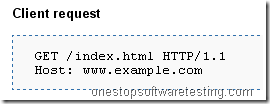
Example

image

image

HTTP status codes

HTTP status codes-1
1xx Class, Informational. Means Request received, continuing process.
This class of status code indicates a provisional response, used in experimental conditions only.
100 Continue
–This means that the server has received the request headers, and that the client should proceed to send the request body
101 Switching Protocols
102 Processing
122 Request-URI too long

HTTP status codes-2
2xx Class Success
The action was successfully received, understood, and accepted.
This class of status code indicates that the client’s request was successfully received, understood, and accepted.
– 200 OK
– Standard response for successful HTTP requests.
202 Accepted
– The request has been accepted for processing, but the processing has not been completed. The request might or might not eventually be acted upon, as it might be disallowed when processing actually takes place.
– 203 Non-Authoritative Information (since HTTP/1.1)
– 204 No Content


HTTP status codes-3
– 3xx Redirection
– The client must take additional action to complete the request.
– This class of status code indicates that further action needs to be taken by the user agent in order to fulfill the request.

301 Moved Permanently
–This and all future requests should be directed to the given URI.

302 Found
–This is the most popular redirect code, but also an example of industrial practice contradicting the standard. HTTP/1.0 specification (RFC 1945) required the client to perform a temporary redirect (the original describing phrase was “Moved Temporarily”), but popular browsers implemented it as a 303 See Other. Therefore, HTTP/1.1 added status codes 303 and 307 to disambiguate between the two behaviors. However, the majority of Web applications and frameworks still use the 302 status code as if it were the 303.

– 305 Use Proxy (since HTTP/1.1)
–Many HTTP clients (such as Mozilla and Internet Explorer) don’t correctly handle responses with this status code, primarily for security reasons.

– 307 Temporary Redirect (since HTTP/1.1)
–In this occasion, the request should be repeated with another URI, but future requests can still use the original URI. In contrast to 303, the request method should not be changed when reissuing the original request. For instance, a POST request must be repeated using another POST request.


HTTP status codes-4
4xx Class Client Error
The 4xx class of status code is intended for cases in which the client seems to have erred. These are typically the most common error codes encountered while online.

400 Bad Request
–The request contains bad syntax or cannot be fulfilled.

401 Unauthorized
–Similar to 403 Forbidden, but specifically for use when authentication is possible but has failed or not yet been provided.

403 Forbidden
–The request was a legal request, but the server is refusing to respond to it. Unlike a 401 Unauthorized response, authenticating will make no difference.

404 Not Found
–The requested resource could not be found but may be available again in the future. Subsequent requests by the client are permissible.