Traceability Matrix from Software Testing perspective

Traceability Matrix from Software Testing perspective

This is a very helpful topic for test leads and managers (also for junior testers if they want to grow).
Traceability Matrix is used in entire software development life cycle phases:

    1. Risk Analysis phase
    2. Requirements Analysis and Specification phase
    3. Design Analysis and Specification phase
    4. Source Code Analysis, Unit Testing & Integration Testing phase
    5. Validation – System Testing, Functional Testing phase

      In this topic we will discuss:

      • What is Traceability Matrix from Software Testing perspective? (Point 5)
      • Types of Traceability Matrix
      • Disadvantages of not using Traceability Matrix
      • Benefits of using Traceability Matrix in testing
      • Step by step process of creating an effective Traceability Matrix from requirements. Sample formats of Traceability Matrix basic version to advanced version.

      In Simple words – A requirements traceability matrix is a document that traces and maps user requirements [requirement Ids from requirement specification document] with the test case ids. Purpose is to make sure that all the requirements are covered in test cases so that while testing no functionality can be missed.
      This document is prepared to make the clients satisfy that the coverage done is complete as end to end, this document consists of Requirement/Base line doc Ref No., Test case/Condition, and Defects/Bug id. Using this document the person can track the Requirement based on the Defect id
      Note – We can make it a “Test case Coverage checklist” document by adding few more columns. We will discuss in later posts
      Types of Traceability Matrix:

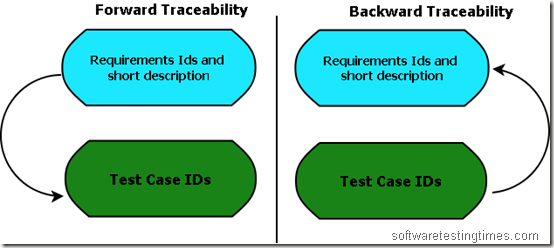
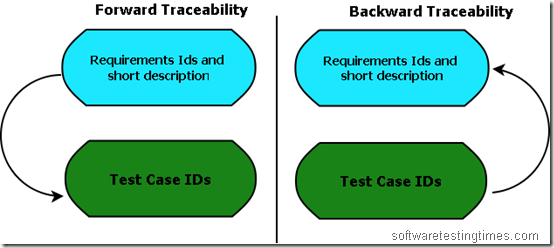
      • Forward Traceability – Mapping of Requirements to Test cases
      • Backward Traceability – Mapping of Test Cases to Requirements
      • Bi-Directional Traceability – A Good Traceability matrix is the References from test cases to basis documentation and vice versa.
      Types of Traceability Matrix


      Why Bi-Directional Traceability is required?
      Bi-Directional Traceability contains both Forward & Backward Traceability. Through Backward Traceability Matrix, we can see that test cases are mapped with which requirements.
      This will help us in identifying if there are test cases that do not trace to any coverage item— in which case the test case is not required and should be removed (or maybe a specification like a requirement or two should be added!). This “backward” Traceability is also very helpful if you want to identify that a particular test case is covering how many requirements?
      Through Forward Traceability – we can check that requirements are covered in which test cases? Whether is the requirements are coved in the test cases or not?

      Forward Traceability Matrix ensures – We are building the Right Product.
      Backward Traceability Matrix ensures – We the Building the Product Right.

      Traceability matrix is the answer of the following questions of any Software Project:

      • How is it feasible to ensure, for each phase of the SDLC, that I have correctly accounted for all the customer’s needs?
      • How can I certify that the final software product meets the customer’s needs? Now we can only make sure requirements are captured in the test cases by traceability matrix.

      Disadvantages of not using Traceability Matrix [some possible (seen) impact]:
      No traceability or Incomplete Traceability Results into:

        1. Poor or unknown test coverage, more defects found in production 
        2. It will lead to miss some bugs in earlier test cycles which may arise in later test cycles. Then a lot of discussions arguments with other teams and managers before release.
        3. Difficult project planning and tracking, misunderstandings between different teams over project dependencies, delays, etc
        Benefits of using Traceability Matrix

        • Make obvious to the client that the software is being developed as per the requirements.
        • To make sure that all requirements included in the test cases
        • To make sure that developers are not creating features that no one has requested
        • Easy to identify the missing functionalities.
        • If there is a change request for a requirement, then we can easily find out which test cases need to update.
        • The completed system may have “Extra” functionality that may have not been specified in the design specification, resulting in wastage of manpower, time and effort.

        Steps to create Traceability Martix:
        1. Make use of excel to create Traceability Matrix:

        2. Define following columns:

        Base Specification/Requirement ID (If any)
        Requirement ID
        Requirement description
        TC 001
        TC 002
        TC 003.. So on.

        3. Identify all the testable requirements in granular level from requirement document. Typical requirements you need to capture are as follows:
        Used cases (all the flows are captured)
        Error Messages
        Business rules
        Functional rules
        SRS
        FRS
        So on…
        4. Identity all the test scenarios and test flows.
        5. Map Requirement IDs to the test cases. Assume (as per below table), Test case “TC 001” is your one flow/scenario. Now in this scenario, Requirements SR-1.1 and SR-1.2 are covered. So mark “x” for these requirements.
        Now from below table you can conclude –
        Requirement SR-1.1 is covered in TC 001
        Requirement SR-1.2 is covered in TC 001
        Requirement SR-1.5 is covered in TC 001, TC 003 [Now it is easy to identify, which test cases need to be updated if there is any change request].
        TC 001 Covers SR-1.1, SR, 1.2 [we can easily identify that test cases covers which requirements].
        TC 002 covers SR-1.3.. So on..

        Requirement ID Requirement description TC 001 TC 002 TC 003
        SR-1.1 User should be able to do this x
        SR-1.2 User should be able to do that x
        SR-1.3 On clicking this, following message should appear x
        SR-1.4 x
        SR-1.5 x x
        SR-1.6 x
        SR-1.7 x

        This is a very basic traceability matrix format. You can add more following columns and make it more effective:
        ID, Assoc ID, Technical Assumption(s) and/or Customer Need(s), Functional Requirement, Status, Architectural/Design Document, Technical Specification, System Component(s), Software Module(s), Test Case Number, Tested In, Implemented In, Verification, Additional Comments,
        Click here to download sample advanced version of traceability matrix.

        Selecting a Software testing Tool | Testing Tools Evaluations

        One of the challenging job for Test Managers and Test Architects is to select a testing tool. Choosing an automated software testing tool is an important step, and one which often poses enterprise-wide implications. Here are several key issues, which should be addressed when selecting an application testing solution. Below are some basic guidelines for selecting and evaluating Software Testing tools for different phases:
        Test Planning and Management –
        A robust testing tool should have the capability to manage the testing process, provide organization for testing components, and create meaningful end-user and management reports. It should also allow users to include non-automated testing procedures within automated test plans and test results. A robust tool will allow users to integrate existing test results into an automated test plan. Finally, an automated test should be able to link business requirements to test results, allowing users to evaluate application readiness based upon the application’s ability to support the business requirements.

        Testing Product Integration –
        Testing tools should provide tightly integrated modules that support test component reusability. Test components built for performing functional tests should also support other types of testing including regression and load/stress testing. All products within the testing product environment should be based upon a common, easy-to-understand language. User training and experience gained in performing one testing task should be transferable to other testing tasks. Also, the architecture of the testing tool environment should be open to support interaction with other technologies such as defect or bug tracking packages.

        Internet/Intranet Testing –
        A good tool will have the ability to support testing within the scope of a web browser. The tests created for testing Internet or intranet-based applications should be portable across browsers, and should automatically adjust for different load times and performance levels.

        Ease of Use –
        Testing tools should be engineered to be usable by non-programmers and application end-users. With much of the testing responsibility shifting from the development staff to the departmental level, a testing tool that requires programming skills is unusable by most organizations. Even if programmers are responsible for testing, the testing tool itself should have a short learning curve.

        GUI and Client/Server Testing –
        A robust testing tool should support testing with a variety of user interfaces and create simple-to manage, easy-to-modify tests. Test component re-usability should be a cornerstone of the product architecture.

        Load and Performance Testing –
        The selected testing solution should allow users to perform meaningful load and performance tests to accurately measure system performance. It should also provide test results in an easy-to-understand reporting format.

        Methodologies and Services –
        For those situations that require outside expertise, the testing tool vendor should be able to provide extensive consulting, implementation, training, and assessment services. The test tools should also support a structured testing methodology.

        Security Testing – Secure Software Development Lifecycle

        Phase 1: Define Security Guidelines, Rules and Compliance Regulations
        First, create a system-wide specification that defines the security requirements that apply to the system; it can be based on specific government regulations. One such company-wide regulation could be the Sarbanes-Oxley Act of 2002, which contains specific security requirements.

        Phase 2: Document Security Requirements, Develop Attack Use Cases
        A common mistake is to omit security requirements from any type of requirements documentation. Not only do security requirements aid in software design, implementation and test case development, they also can help determine technology choices and areas of risk.
        Phase 3: Perform Architectural and Design Reviews; Identify and Define Threat Models
        Security practitioners need a solid understanding of the product’s architecture and design so that they can devise better and more complete security strategies, plans, designs, procedures and techniques. Early security team involvement can prevent insecure architectures and low-security designs, as well as help eliminate confusion about the application’s behavior later in the project life cycle.

        Phase 4: Use Secure Coding Guidelines; Differentiate Between Design and Implementation Vulnerabilities
        To understand how vulnerabilities get into all software, the developer must learn how to prevent them from sneaking into programs and must be able to differentiate design versus implementation vulnerabilities.
        A design vulnerability is a flaw in the design that precludes overflows, and their output can help developers learn to prevent the errors in the first place.

        Phase 5:Black-,White- And Gray-Box Testing
        Black-, white- and gray-box testing refer to the perspective of the tester when designing test cases—black from outside with no visibility into the application under test, white from inside with total source code visibility, and gray with access to source code and the ability to seed target data and build specific tests for specific results.

        Phase 6: Determine the Exploitability of Your Vulnerabilities
        Ideally, every vulnerability discovered in the testing phase of the SSDL can be easily fixed. But depending on the cause, whether a design or implementation error, the effort required to address it can vary widely.
        Determining a vulnerability’s exploitability involves weighing five factors:
        • The access or positioning required by the attacker to attempt exploitation
        • The level of access or privilege yielded by successful exploitation
        • The time or work factor required to exploit the vulnerability
        • The exploit’s potential reliability
        • The repeatability of exploit attempts

        To determine exploitability, the risks of each vulnerability are used to prioritize, comparing them against each other; then, based on risk and priority, to address the vulnerabilities and other development tasks (such as new features).

        This is also the phase in which you can manage external vulnerability reports.

        Secure Software Development Lifecycle (SSDL) was introduced by Elfriede Dustin in 2006.

        Unit Testing – Points to take care

        White box testers, Unit Testers, Development Teams usually heard these  words from managers – “After performing unit testing Why manual testing team still finding critical bugs? Why you are not performing Unit Testing?”
        Actual – They perform unit testing but not standard unit testing. When writing the unit test consider the following when looking for things to test:
        Functional
        Does the piece of code functionally perform the task it is designed to do?
        Boundaries
        What are the minimum, maximum values for the function, will the function accept strange characters, reserved SQL characters, alpha and numeric values? What happens if they are not within these boundaries?
        Termination
        What happens in the normal termination of the function? What about an abnormal termination of the function? Will the application continue or will an error occur. Is the error trapped?

        Outputs
        What are the expected outputs of the function? Where do they go, what else uses them, what happens if the output is nothing? What happens if the output cannot be passed to the next function? i.e. The database was unavailable when attempting to write to it.
        Algorithms and Computations
        Do all the algorithms and computations work, what happens if the wrong values are passed to them, are the variables stored as correct types i.e. will the result exceed 32267 (integer).
        Inputs
        What are the expected inputs to the function? Where do they come from? What happens if they do not get passed in? What happens if they are the wrong type? i.e. an alpha instead of a numeric. Do they rely on any third party application?
        Interaction
        What other modules/functions does this interact with? Will those be effected by the change?
        Transactions
        What type of transactions will occur? What will happen if a single transaction fails, is interrupted or succeeds? Are the transactions event driven, system initiated, user driven, or time driven?

        Related Posts:
        1. Unit Testing Framework – An introduction
        2. Testing with Visual Studio Team System – Static Code Analyzer | Code Profiler | Unit Testing

        The Testing Mindset

        .. Continuing the Beginners Guide to Software Testing series

        A professional tester approaches a product with the mind-set that the product is already broken – it has bugs and it is their job to find out them. They suppose the application under test is inherently defective and it is their job to ‘illuminate’ the defects.

        This methodology/approach is required in testing.

        Designers and developers approach software with an optimism based on the guess/assumption that the changes they make are the accurate solution to a particular problem. But they are just that – assumptions.
        Without being proved they are no more correct than guesses. Developers often neglect primary ambiguities in specification documents in order to complete the project; or they fail to identify them when they see them. Those ambiguities are then built into the code and represent a bug when compared to the end-user’s needs.
        By taking a skeptical approach, the tester offers a balance.

        A Good Professional tester:

        • Takes nothing at face value.
        • Always asks the question “why?”
        • Seek to drive out certainty where there is none.
        • Seek to illuminate the darker part of the projects with the light of inquiry.

        Sometimes this attitude can bring argument with Development Team. But development team can be testers too! If they can accept and adopt this state of mind for a certain portion of the project, they can offer excellent quality in the project and reduce cost of the project.
        Identifying the need for Testing Mindset is the first step towards a successful test approach and strategy.

        Must Read – Testing ISN’T About Learning. It is About Thinking.