Record on LoadRunner’s VuGen using a QTP script – Automation testing Tip

1. Bring up VuGen. Create a New script selecting Web (HTTP/HTML) protocol.

2. Start record button.

3. Then, bring up QTP and make sure the option on “Record and Run Settings” dialog be with– Record and Run test on any Open web browser, radio button.

4. Start ‘Record’ on QTP and perform the user activities on the browser invoked by the VuGen.

5. Both VuGen and QTP would record the actions on their interfaces.

This way we can make sure the VuGen to record the same sequence of user actions/events by ‘Replaying’ the QTP recorded script, after a browser is initiated by the VuGen’s recording engine.
Software Tester’s Mental Life


Boris Beizer, identified five phases of a tester’s mental life:

Phase 0: There’s no difference between testing and debugging. Other than in support of debugging, testing has no purpose.

Phase 0 Thinking: Testing = Debugging

Phase 1: The purpose of testing is to show that the software works.

Phase 1 Thinking: The S/W Works

Phase 2: The purpose of testing is to show that the software doesn’t work.

Phase 2 Thinking: The S/W Doesn’t Work

Phase 3: The purpose of testing is not to prove anything, but to reduce the perceived risk of the software not working to an acceptable value.

Phase 3 Thinking: Test for Risk Reduction

Phase 4: Testing is not an act. It is a mental discipline that results in low-risk software without much testing effort.

Phase 4 Thinking: A State of Mind

Now think – Which tester’s mental phase are you?


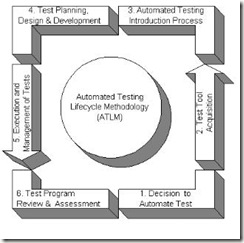
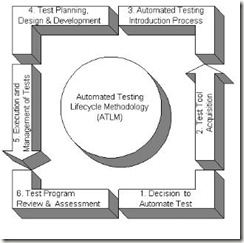
Automation Testing LifeCycle/Process Simplified

Automation Testing LifeCycle/Process Simplified

Automation Testing LifeCycle

Phase Activities Outcome
Planning Create high level test plan Test plan, Refined Specification
Analysis Create detailed test plan, Functional Validation Matrix, test cases Revised Test Plan, Functional validation matrix, test cases
Design test cases are revised; select which test cases to automate revised test cases, test data sets, sets, risk assessment sheet
Construction scripting of test cases to automate, test procedures/Scripts, Drivers, test results, Bug Reports.
Testing cycles complete testing cycles Test results, Bug Reports
Final testing execute remaining stress and performance tests, complete documentation Test results and different metrics on test efforts
Post implementation (See Post Project Reviews in testing) Evaluate testing processes Plan for improvement of testing process


Guidelines/Best Practices for effective Software Test Planning – Part 2

Guidelines/Best Practices for effective Software Test Planning – Part 2

Test Plan First

Following are the guidelines/best practices for effective test planning:

  • Identify the requirements to be tested. All test cases shall be derived using the current Design Specification.
  • Identify which particular test(s) you’re going to use to test each module.
  • Review the test data and test cases to ensure that the unit has been thoroughly verified and that the test data and test cases are adequate to verify proper operation of the unit.
  • Identify the expected results for each test.
  • Document the test case configuration, test data, and expected results. This information shall be submitted via the on-line Test Case Design(TCD) and filed in the unit’s Software Development File(SDF). A successful Peer Technical Review baselines the TCD and initiates coding.
  • Perform the test(s).
  • Document the test data, test cases, and test configuration used during the testing process. This information shall be submitted via the on-line Unit/System Test Report(STR) and filed in the unit’s Software Development File(SDF).
  • Successful unit testing is required before the unit is eligible for component integration/system testing.
  • Unsuccessful testing requires a Program Trouble Report to be generated. This document shall describe the test case, the problem encountered, its possible cause, and the sequence of events that led to the problem. It shall be used as a basis for later technical analysis.
  • Test documents and reports shall be submitted on-line. Any specifications to be reviewed, revised, or updated shall be handled immediately.
  • Deliverables: Test Case Design, System/Unit Test Report, Problem Trouble Report(if any). 

Reference/Source: http://users.csc.calpoly.edu/~sroliver/csc405/test/swtplan1.html

Must Read – Test Plan Prep Guidelines – Part 1

Purpose & Advantages of Test Plan

Purpose & Advantages of Test Plan


 Test Plan First


TEST PLAN

  • The test plan keeps track of possible tests that will be run on the system after coding.
  • The test plan is a document that develops as the project is being developed.
  • Record tests as they come up
  • Test error prone parts of software development.
  • The initial test plan is abstract and the final test plan is concrete.
  • The initial test plan contains high level ideas about testing the system without getting into the details of exact test cases.
  • The most important test cases come from the requirements of the system.
  • When the system is in the design stage, the initial tests can be refined a little.
  • During the detailed design or coding phase, exact test cases start to materialize.
  • After coding, the test points are all identified and the entire test plan is exercised on the software.

Purpose of Software Test Plan:

  • Test Plan Ensures all Functional and Design Requirements are implemented as specified in the documentation.
  • To provide a procedure for Unit and System Testing.
  • To identify the documentation process for Unit and System Testing.
  • To identify the test methods for Unit and System Testing.

Advantages of test plan

  • Serves as a guide to testing throughout the development.
  • We only need to define test points during the testing phase.
  • Serves as a valuable record of what testing was done.
  • The entire test plan can be reused if regression testing is done later on.
  • The test plan itself could have defects just like software!

In software testing, a test plan gives detailed testing information regarding an upcoming testing effort, including

  • Scope of testing
  • Schedule
  • Test Deliverables
  • Release Criteria
  • Risks and Contingencies