
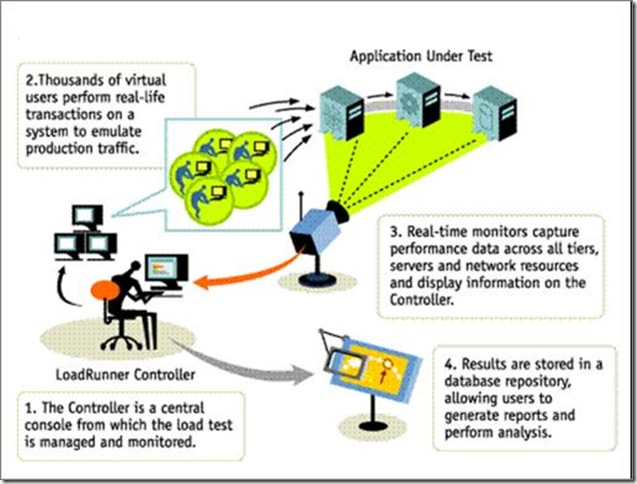
Loadrunner Introduction, How Loadrunner Works
We already discuss – Why performance Testing is Required and limitations of Manual Testing in Performance Testing. In this topic, we will discuss the process of Loadrunner Testing.
Read previous Article here: http://www.softwaretestingtimes.com/2010/05/loadperformance-testing-limitations.html
Read previous Article here: http://www.softwaretestingtimes.com/2010/05/loadperformance-testing-limitations.html
HP LoadRunner Process:
- LoadRunner emulates hundreds or thousands of human users with Virtual Users (Vusers) to apply measurable & repeatable production workloads and stresses an Application end-to-end.
- Vusers emulate the actions of human users by performing typical Business Processes.
- For each user action, the tool submits an input request to server and receives the response.
- Increase number of Vusers, to increase the load on the Server.

Some Useful File System Scripts for QTP – Automation Testing
FSO stands for Files system object, during testing we need to do some basic task like add, move, copy, create and delete folders and files. We can also handle drives related things using File system object method. So It is very much important to learn File system object.
Below are some Useful QTP File System Scripts:
1) Create a Folder
Option Explicit
Dim objFSO, objFolder, strDirectory
strDirectory = “D:BraidyHunter”
Set objFSO = CreateObject(“Scripting.FileSystemObject”)
Set objFolder = objFSO.CreateFolder(strDirectory)
2) Delete a Folder
Set oFSO = CreateObject(“Scripting.FileSystemObject”)
oFSO.DeleteFolder(“E:BraidyHunter”)
3) Copying Folders
Set oFSO=createobject(“Scripting.Filesystemobject”)
oFSO.CopyFolder “E:gcr”, “C:jvr”, True
4) Checking weather the folder available or not, if not creating the folder
Option Explicit
Dim objFSO, objFolder, strDirectory
strDirectory = “D:BraidyHunter”
Set objFSO = CreateObject(“Scripting.FileSystemObject”)
If objFSO.FolderExists(strDirectory) Then
Set objFolder = objFSO.GetFolder(strDirectory)
msgbox strDirectory & ” already created “
else
Set objFolder = objFSO.CreateFolder(strDirectory)
end if
5) Returning a collection of Disk Drives
Set oFSO = CreateObject(“Scripting.FileSystemObject”)
Set colDrives = oFSO.Drives
For Each oDrive in colDrives
MsgBox “Drive letter: ” & oDrive.DriveLetter
Next
6) Getting available space on a Disk Drive
Set oFSO = CreateObject(“Scripting.FileSystemObject”)
Set oDrive = oFSO.GetDrive(“C:”)
MsgBox “Available space: ” & oDrive.AvailableSpace
Guide to Useful Software Test Metrics
I) Introduction
When we can measure what we are speaking about and express it in numbers, we know something about it; but when we cannot measure, when we cannot express it in numbers, our knowledge is of a meager and unsatisfactory kind: it may be the beginning of knowledge, but we have scarcely, in your thoughts, advanced to the stage of science.
When we can measure what we are speaking about and express it in numbers, we know something about it; but when we cannot measure, when we cannot express it in numbers, our knowledge is of a meager and unsatisfactory kind: it may be the beginning of knowledge, but we have scarcely, in your thoughts, advanced to the stage of science.
Why we need Metrics?
“We cannot improve what we cannot measure.”
“We cannot control what we cannot measure”
AND TEST METRICS HELPS IN
- Take decision for next phase of activities
- Evidence of the claim or prediction
- Understand the type of improvement required
- Take decision on process or technology change
II) Type of metrics
Base Metrics (Direct Measure)
Base metrics constitute the raw data gathered by a Test Analyst throughout the testing effort. These metrics are used to provide project status reports to the Test Lead and Project Manager; they also feed into the formulas used to derive Calculated Metrics.
Ex: # of Test Cases, # of Test Cases Executed
Calculated Metrics (Indirect Measure)
Calculated Metrics convert the Base Metrics data into more useful information. These types of metrics are generally the responsibility of the Test Lead and can be tracked at many different levels (by module, tester, or project).
Ex: % Complete, % Test Coverage
- • # of Test Cases (Test Development Phase)
- • # of Test Cases Executed (Test Execution Phase)
- • # of Test Cases Passed (Test Execution Phase)
- • # of Test Cases Failed (Test Execution Phase)
- • # of Test Cases Under Investigation (Test Development Phase)
- • # of Test Cases Blocked (Test dev/execution Phase)
- • # of Test Cases Re-executed (Regression Phase)
- • # of First Run Failures (Test Execution Phase)
- • Total Executions (Test Reporting Phase)
- • Total Passes (Test Reporting Phase)
- • Total Failures (Test Reporting Phase)
- • Test Case Execution Time ((Test Reporting Phase)
- • Test Execution Time (Test Reporting Phase
Calculated Metrics & Phases
The below metrics are created at Test Reporting Phase or Post test Analysis phase
- • % Complete
- • % Defects Corrected
- • % Test Coverage
- • % Rework
- • % Test Cases Passed
- • % Test Effectiveness
- • % Test Cases Blocked
- • % Test Efficiency
- • 1st Run Fail Rate
- • Defect Discovery Rate
- • Overall Fail Rate
III) Crucial Web Based Testing Metrics
Test Plan coverage on Functionality
Total number of requirement v/s number of requirements covered through test scripts.
- • (No of requirements covered / total number of requirements) * 100
Define requirements at the time of Effort estimation
Example: Total number of requirements estimated are 46, total number of requirements tested 39; blocked 7…define what is the coverage?
Note: Define requirement clearly at project level
Test Case defect density
Total number of errors found in test scripts v/s developed and executed.
- • (Defective Test Scripts /Total Test Scripts) * 100
Example: Total test script developed 1360, total test script executed 1280, total test script passed 1065, total test script failed 215
So, test case defect density is
215 X 100
—————————- = 16.8%
1280
This 16.8% value can also be called as test case efficiency %, which is depends upon total number of test cases which uncovered defects
Defect Slippage Ratio
Number of defects slipped (reported from production) v/s number of defects reported during execution.
- • Number of Defects Slipped / (Number of Defects Raised – Number of Defects Withdrawn)
Example: Customer filed defects are 21, total defect found while testing are 267, total number of invalid defects are 17
So, Slippage Ratio is
[21/ (267-17)] X 100 = 8.4%
Requirement Volatility
Number of requirements agreed v/s number of requirements changed.
- • (Number of Requirements Added + Deleted + Modified) *100 / Number of Original Requirements
- • Ensure that the requirements are normalized or defined properly while estimating
Example: VSS 1.3 release had total 67 requirements initially, later they added another 7 new requirements and removed 3 from initial requirements and modified 11 requirements
So, requirement Volatility is
(7 + 3 + 11) * 100/67 = 31.34%
Means almost 1/3 of the requirement changed after initial identification
Review Efficiency
The Review Efficiency is a metric that offers insight on the review quality and testing
Some organization also use this term as “Static Testing” efficiency and they are aiming to get min of 30% defects in static testing
Review efficiency=100*Total number of defects found by reviews/Total number of project defects
Example: A project found total 269 defects in different reviews, which were fixed and test team got 476 defects which were reported and valid
So, Review efficiency is [269/(269+476)] X 100 = 36.1%
Efficiency and Effectiveness of Processes
- • Effectiveness: Doing the right thing. It deals with meeting the desirable attributes that are expected by the customer.
- • Efficiency: Doing the thing right. It concerns the resources used for the service to be rendered
Metrics for Software Testing
• Defect Removal Effectiveness
DRE= (Defects removed during development phase x100%) / Defects latent in the product
Defects latent in the product = Defects removed during development
Phase+ defects found later by user
• Efficiency of Testing Process (define size in KLoC or FP, Req.)
Testing Efficiency= Size of Software Tested /Resources used
References –
1. Measuring software product quality during testing by Rob Hendriks, Robert van Vonderen and Erik van Veenendaal
2. Software Metrics: A Rigorous Approach by: Norman E. Fenton
3. Software Test Metrics – A Practical Approach by Shaun Bradshaw
4. Testing Effectiveness Assessment (an article by Software Quality Consulting)
5. P.R.Vidyalakshmi
6. Measurement of the Extent of Testing (http://www.kaner.com/pnsqc.html)
7. http://www.stickyminds.com/
8. Effective Test Status Reporting by Rex Black
9. http://www.projectmanagement.tas.gov.au/guidelines/pm5_10.htm
10. http://whatis.com/
11. Risk Based Test Reporting by Paul Gerrard
Are you a software testing expert?
Are you thinking that you are a Software Testing Expert? Answer below questions in comments and judge yourself. For answers, select only one option and explain why you choose this option.
Exhaustive testing is impossible
Testing shows presence of defects.
Confusing an absence of errors with product fit is a fallacy
Exhaustive testing is impossible
Testing shows presence of defects.
Confusing an absence of errors with product fit is a fallacy
By – Anaya Johri
Question 1: You need to test a login screen. There is only one user id field which accepts 12 digits. As per the specs, it should accept only these values – 123456789012 or 098765432123 or 543216789091. Which software testing principle would use to design tests for this software?
Options:
Question 2: Your company has developed a product similar to MS Office. You have tested the application and it has passed all testing cycles. Your marketing team is selling the product by telling the client “Our product has passed Extremely thorough testing, and it is 100% bug free!”. Which principle of software testing is your marketing team not familiar with?
Options:
- Exhaustive testing is impossible
- Testing shows presence of defects.
- Confusing an absence of errors with product fit is a fallacy
Question 3: You company has designed a Asset Management System.This system enables users to enter assets metadata. There are some basic rules and validations implemented like for date fields, numeric fields, duplicate asset names, etc. You have designed tests for this system. Later you come to know, that client will integrate their existing system to new system for data import. That integration system will not be available to test team for testing. Later, you and your team test the application and it passes all testing cycles successfully. Which software testing principle did your team overlook while designing tests?
Options:
Answer below questions in comments and judge yourself. For answers, select only one option and explain why you choose this option.
Special Announcement:
We now have a YouTube Channel. Click here to Subscribe.

Recent Comments