Equivalence Class Partitioning Simplified

.. Continuing the Beginners Guide to Software Testing series

WHAT IS EQUIVALENCE PARTITIONING?
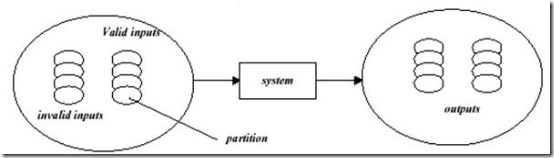
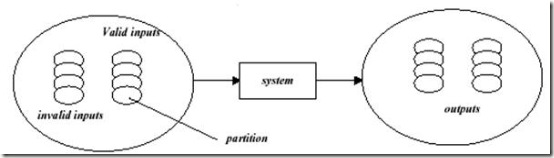
Concepts:   Equivalence partitioning is a method for deriving test cases.  In this method, classes of input conditions called equivalence classes are identified such that each member of the class causes the same kind of processing and output to occur.
In this method, the tester identifies various equivalence classes for partitioning.  A class is a set of input conditions that are is likely to be handled the same way by the system.  If the system were to handle one case in the class erroneously, it would handle all cases erroneously.
WHY LEARN EQUIVALENCE PARTITIONING?
Equivalence partitioning significantly reduces the number of test cases required to test a system reasonably.  It is an attempt to get a good ‘hit rate’, to find the most errors with the smallest number of test cases.
DESIGNING TEST CASES USING EQUIVALENCE PARTITIONING
To use equivalence partitioning, you will need to perform two steps
1. Identify the equivalence classes
2. Design test cases
STEP 1: IDENTIFY EQUIVALENCE CLASSES
Take each input condition described in the specification and derive at least two equivalence classes for it.  One class represents the set of cases which satisfy the condition (the valid class) and one represents cases which do not (the invalid class).
Following are some general guidelines for identifying equivalence classes:
a) If the requirements state that a numeric value is input to the system and must be within a range of values, identify one valid class inputs which are within the valid range and two invalid equivalence classes inputs which are too low and inputs which are too high. 
For example, if an item in inventory (numeric field) can have a quantity of +1 to +999, identify the following classes:  
1. One valid class:   (QTY is greater than or equal to +1 and is less than or equal to +999).   This is written as (+1 < = QTY < = 999)
2. The invalid class (QTY is less than 1), also written as (QTY < 1) i.e. 0, -1, 2, … so on
3. The invalid class (QTY is greater than 999), also written as (QTY >999) i.e. 1000, 1001, 1002, 1003… so on.

Invalid class Valid Class Invalid class
0 1 1000
-1 2 1001
-2 3 1002
-3 4 1003
-4… So on 5… up to 999 1004.. So on

b) If the requirements state that the number of items input by the system at some point must lie within a certain range, specify one valid class where the number of inputs is within the valid range, one invalid class where there are too few inputs and one invalid class where there are too many inputs.
For example, specifications state that a maximum of 4 purchase orders can be registered against anyone product.  The equivalence classes are: the valid equivalence class: (number of purchase an order is greater than or equal to 1 and less than or equal to 4, also written as (1   < = no. of purchase orders < =   4) the invalid class  (no.  of purchase orders> 4) the invalid class  (no.  of purchase orders <  1)
c) If the requirements state that a particular input item match one of a set of values and each case will be dealt with the same way, identify a valid class for values in the set and one invalid class representing values outside of the set. 
Says that the code accepts between 4 and 24 inputs; each is a 3-digit integer:
– One partition: number of inputs
– Classes “x<4”, “4<=x<=24”, “24<x”
– Chosen values: 3,4,5,14,23,24,25
Go back to Test Design Techniques
Related Posts: Methods of Black Box Testing
Gray Box Testing

.. Continuing the Beginners Guide to Software Testing series

Gray Box Testing –

  • It is just a combination of both Black box & white box testing.
  • It is platform independent and language independent.
  • Used to test embedded systems.
  • Functionality and behavioral parts are tested.
  • Tester should have the knowledge of both the internals and externals of the function
  • If you know something about how the product works on the inside, you can test it better from the outside.

Gray box testing is especially important with Web and Internet applications, because the Internet is built around loosely integrated components that connect via relatively well-defined interfaces. Unless you understand the architecture of the Net, your testing will be skin deep.
Go back to Test Design Techniques

White Box Testing

.. Continuing the Beginners Guide to Software Testing series

White Box Testing

  • Testing the Internal program logic
  • White box testing is also called as Structural testing.
  • User does require the knowledge of software code.

Purpose

  • Testing all loops
  • Testing Basis paths
  • Testing conditional statements
  • Testing data structures
  • Testing Logic Errors
  • Testing Incorrect assumptions

Structure = 1 Entry + 1 Exit with certain Constraints, Conditions and Loops.
Logic Errors and incorrect assumptions most are likely to be made while coding for “special cases”. Need to ensure these execution paths are tested.
Approaches / Methods / Techniques for White Box Testing
Basic Path Testing (Cyclomatic Complexity(Mc Cabe Method)

  • Measures the logical complexity of a procedural design.
  • Provides flow-graph notation to identify independent paths of processing
  • Once paths are identified – tests can be developed for – loops, conditions
  • Process guarantees that every statement will get executed at least once.

Structure Testing:

  • Condition Testing – All logical conditions contained in the program module should be tested.
  • Data Flow Testing- Selects test paths according to the location of definitions and use of variables.
  • Loop Testing:
    • Simple Loops
    • Nested Loops
    • Concatenated Loops
    • Unstructured Loops

Go back to Test Design Techniques

Methods of Black box Testing

Methods of Black box Testing

.. Continuing the Beginners Guide to Software Testing series

The following basic techniques are employed during black box testing:

  • Equivalence Class
  • Boundary Value Analysis
  • Error Guessing

Equivalence Class:

  • For each piece of the specification, generate one or more equivalence Class
  • Label the classes as “Valid” or “Invalid”
  • Generate one test case for each Invalid Equivalence class
  • Generate a test case that covers as many Valid Equivalence Classes as possible

Equivalence Class

An input condition for Equivalence Class:

  • A specific numeric value
  • A range of values
  • A set of related values
  • A Boolean condition


Equivalence classes can be defined using the following guidelines:

  • If an input condition specifies a range, one valid and two invalid equivalence class are defined.
  • If an input condition requires a specific value, one valid and two invalid equivalence classes are defined.
  • If an input condition specifies a member of a set, one valid and one invalid equivalence classes are defined.
  • If an input condition is Boolean, one valid and one invalid classes are defined.

Boundary Value Analysis

  • Generate test cases for the boundary values.
  • Minimum Value, Minimum Value + 1, Minimum Value -1
  • Maximum Value, Maximum Value + 1, Maximum Value – 1

Error Guessing.

  • Generating test cases against to the specification.

Go back to Test Design Techniques