HP WinRunner exam HP0-M12 sample questions

HP WinRunner exam HP0-M12 sample questions
HP WinRunner exam HP0-M12 sample questions. These questions will definitely help you is passing the exam with good score.

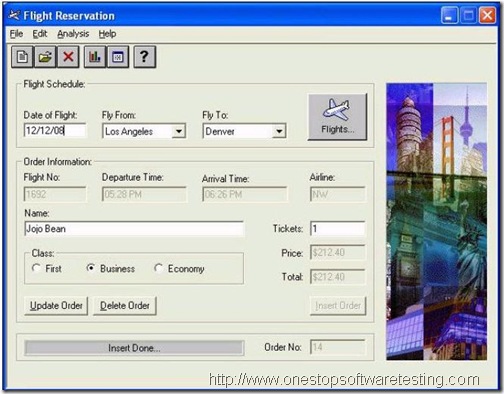
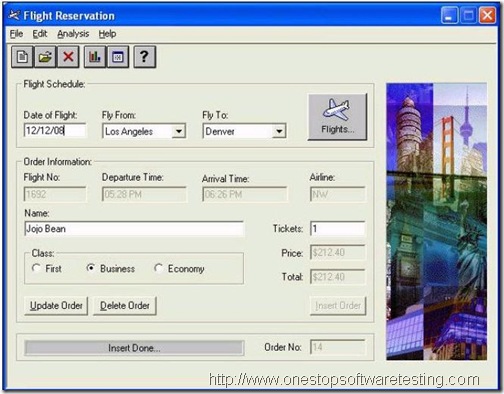
QUESTION: 1 Exhibit:
HP Winrunner Certification Practice exam

You want to synchronize on the Status Bar with the text “Insert Done… “. Which TSL statement would meet this requirement?

A. wait(10);
B. obj_check_gui(“Insert Done…”, “list1.ckl”, “gui1”, 16);
C. obj_wait_info(“Insert Done…”,”label”,”Insert Done…”,10);
D. obj_check_info(“Insert Done…”,”label”,”Insert Done…”,10);
Answer: C

QUESTION: 2
How do you specify a 15-second timeout in the global timeout settings?
A. 15
B. 150
C. 1500
D. 15000
Answer: D
QUESTION: 3
Exhibit:
2 HP Winrunner Certification Practice exam
Which method should you use to synchronize the application after logging in?
A. wait for a bitmap to refresh
B. wait for a window to appear
C. wait for an object state change
D. wait for a process screen to complete
Answer: B
QUESTION: 4
You are testing a banking application. At 8 AM an employee logs in successfully and it takes about 5 seconds for the main menu window to appear. At 9 AM it takes approximately 15 seconds for the main menu window to appear after login. If you were to incorporate this time difference in a script, which WinRunner feature would you use so that the script runs successfully despite the difference in time for the main menu window to appear?
A. Verify
B. Data drive
C. Synchronize
D. Parameterize
Answer: C
QUESTION: 5
Which synchronization statement is automatically generated during recording?
A. win_activate(“Flight Reservation”);
B. set_window (“Flight Reservation 10”);
C. obj_wait_bitmap(“Flights”,”Img2″,6,7,8,101,114);
D. obj_wait_info(“Insert Done…”,”label”,”Insert Done…”,10);
Answer: B
QUESTION: 6
The process for building a functional WinRunner script goes through four steps. What are these steps? (Select four.)
A. plan the test
B. synchronize
C. record steps
D. parameterize
E. add verification
F. analyze results
G. execute the test
Answer: B, C, E, G
QUESTION: 7
A test script contains both Context Sensitive and Analog recording. The script keeps failing on the window where the Analog recording is played back. Which function can you include in your script to ensure that windows and objects are in the same locations as when the test was recorded?
A. win_move function
B. GUI_load function
C. invoke_app function
D. set_window function
Answer: A
QUESTION: 8
In which file does WinRunner store user actions on the application under test captured during recording?
A. lock
B. script
C. chklist
D. debug
Answer: B
QUESTION: 9
During recording, WinRunner “listens” to the actions a user performs on the application (and to the response from the server) and creates a log of these steps. Which language does WinRunner use to create these steps in a script?
A. C Language
B. VBScript Language
C. Test Script Language
D. Virtual User Language
Answer: C
QUESTION: 10
What is the default recording mode that WinRunner uses?
A. Analog
B. Low-level
C. Standard / Default
D. Context Sensitive
Answer: D
QUESTION: 11
In a test, you have to record both in Context Sensitive and Analog modes. Which method should you use to switch recording from Analog back to Context Sensitive without capturing the mouse movements in the test script?
A. Toolbar
B. Softkey
C. Menu command
D. Right click (popup menu)
Answer: B
QUESTION: 12
What does the function move_locator_track( ) represent?
A. a mouse over
B. a mouse click
C. a keyboard entry
D. a function key press
Answer: A
QUESTION: 13
The test lead wants a copy of the WinRunner script you created. To provide him with a workable copy, which file or files do you need to supply? Assume that the name of the test is Test1A under which the following files and folders are included: lock, script, chklist, db, debug, exp, res1.
A. Script.zip
B. Test1A.zip
C. Script, db, exp, res1 in a zip file
D. Lock, script, chklist, and db in a zip file
Answer: B
QUESTION: 14
What is referred to as a WinRunner script that is used to initialize the working environment, including UI_load( ) and GUI_close_all( ) statements before test scripts are run?
A. Loader script
B. Startup script
C. Function Library
D. Function Generator
Answer: B
QUESTION: 15
Upon invoking WinRunner, which feature lists the types of applications you can test?
A. Add-In Manager
B. RapidTest Wizard
C. DataTable Wizard
D. Recovery Scenario
Answer: A
QUESTION: 16 A test run fails because of an unrecognized object. You want to compare the actual object properties to the properties stored in the GUI Map file. Which WinRunner feature compares the actual object properties versus the properties in the GUI Map and provides a possible reason for the error?
A. GUI Spy
B. Data Driver Wizard
C. Run Wizard
D. Virtual Object Wizard
E. RapidTest Script Wizard
Answer: C
QUESTION: 17
Exhibit:
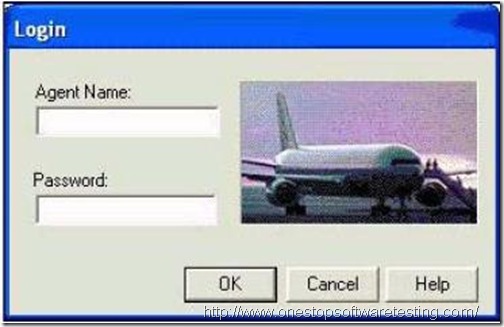
3 HP Winrunner Certification Practice exam
The application under test has a new Login window. The objects need to be added to the GUI Map file. What is the best way to add these items in the GUI Map file?
A. use the GUI Map Wizard
B. use the Learn feature to learn each button
C. use the Add feature to add each button separately
D. use the Learn feature to learn all objects in the Login window
Answer: D
QUESTION: 18
How does WinRunner set up the GUI Map file for a new test?
A. WinRunner automatically executes a GUI_load statement.
B. WinRunner automatically loads the last opened GUI Map file.
C. WinRunner automatically creates a new GUI Map file for the test.
D. WinRunner automatically loads a shared GUI Map file it recognizes.
Answer: C
QUESTION: 19
If you want to save your recovery function, where is the best location to save the recovery for every test in your project?
A. Paste the recovery function in each test.
B. Add the recovery function in the startup script.
C. Add the recovery function in the function generator.
D. The recovery manager saves its own recovery function.
Answer: B
QUESTION: 20
Which main components must be present in a simple and compound recovery scenario? (Select two.)
A. an event
B. an exit function
C. unknown object
D. recovery operation
E. post-recovery operation
Answer: A, D

Step by Step guide to Test Case Development

Step by Step guide to Test Case Development

 .. Continuing the Beginners Guide to Software Testing series
T
est Case is a commonly used term for a specific test. This is usually the smallest unit of testing. A Test Case will consist of information such as requirements testing, test steps, verification steps, prerequisites, outputs, test environment, etc.

A Test Case is:
– A set of inputs, execution preconditions, and expected outcomes developed for a particular objective, such as to exercise a particular program path or to verify compliance with a specific requirement.

– A detailed procedure that fully tests a feature or an aspect of a feature. Whereas the test plan describes what to test, a test case describes how to perform a particular test. You need to develop a test case for each test listed in the test plan.

Test cases should be written by a team member who understands the function or technology being tested, and each test case should be submitted for peer review.

Organizations take a variety of approaches to documenting test cases; these range from developing detailed, recipe-like steps to writing general descriptions. In detailed test cases, the steps describe exactly how to perform the test. In descriptive test cases, the tester decides at the time of the test how to perform the test and what data to use.

Detailed test cases are recommended to test a software because determining pass or fail criteria is usually easier with this type of case. In addition, detailed test cases are reproducible and are easier to automate than descriptive test cases. This is particularly important if you plan to compare the results of tests over time, such as when you are optimizing configurations. Detailed test cases are more time-consuming to develop and maintain. On the other hand, test cases that are open to interpretation are not repeatable and can require debugging, consuming time that would be better spent on testing.

When planning your tests, remember that it is not feasible to test everything. Instead of trying to test every combination, prioritize your testing so that you perform the most important tests — those that focus on areas that present the greatest risk or have the greatest probability of occurring — first.

Once the Test Lead prepared the Test Plan, the role of individual testers will start from the preparation of Test Cases for each level in the Software Testing like Unit Testing, Integration Testing, System Testing and User Acceptance Testing and for each Module.

General Guidelines to Prepare Test Cases

As a tester, the best way to determine the compliance of the software to requirements is by designing effective test cases that provide a thorough test of a unit. Various test case design techniques enable the testers to develop effective test cases. Besides, implementing the design techniques, every tester needs to keep in mind general guidelines that will aid in test case design: 

a. The purpose of each test case is to run the test in the simplest way possible. [Suitable techniques – Specification derived tests, Equivalence partitioning]
b. Concentrate initially on positive testing i.e. the test case should show that the software does what it is intended to do. [Suitable techniques – Specification derived tests, Equivalence partitioning, State-transition testing]
c. Existing test cases should be enhanced and further test cases should be designed to show that the software does not do anything that it is not specified to do i.e. Negative Testing [Suitable techniques – Error guessing, Boundary value analysis, Internal boundary value testing, State transition testing]
d. Where appropriate, test cases should be designed to address issues such as performance, safety requirements and security requirements [Suitable techniques – Specification derived tests]
e. Further test cases can then be added to the unit test specification to achieve specific test coverage objectives. Once coverage tests have been designed, the test procedure can be developed and the tests executed [Suitable techniques – Branch testing, Condition testing, Data definition-use testing, State-transition testing]

Test Case Template

To prepare these Test Cases each organization uses their own standard template, an ideal template is providing below to prepare Test Cases.
Common Columns in Test cases that are present in all Test case formats

Fig 1: Common Columns in Test cases that are present in all Test case formats

Low Level Test Case format

Fig 2: A very details Low Level Test Case format

The Name of this Test Case Document itself follows some name convention like below so that by seeing the name we can identify the Project Name and Version Number and Date of Release.

DTC_Functionality Name_Project Name_Ver No

DTC – Detailed Test Case
Functionality Name: For which the test cases is developed
Project Name: Name of the Project
Ver No: Version number of Software
(You can add Release Date also)

The bolded words should be replaced with the actual Project Name, Version Number and Release Date. For eg. Bugzilla Test Cases 1.2.0.3 01_12_04

On the Top-Left Corner we have company emblem and we will fill the details like Project ID, Project Name, Author of Test Cases, Version Number, Date of Creation and Date of Release in this Template.

And we will maintain the fields Test Case ID, Requirement Number, Version Number, Type of Test Case, Test Case Name, Action, Expected Result, Cycle#1, Cycle #2, Cycle#3, Cycle#4 for each Test Case. Again this Cycle is divided into Actual Result, Status, Bug ID and Remarks.

Test Case ID:
To Design the Test Case ID also we are following a standard: If a test case belongs to application not specifically related to a particular Module then we will start them as TC001, if we are expecting more than one expected result for the same test case then we will name it as TC001.1. If a test case is related to Module then we will name it as M01TC001, and if a module is having a sub-module then we name that as M01SM01TC001. So that we can easily identify to which Module and which sub-module it belongs to. And one more advantage of this convention is we can easily add new test cases without changing all Test Case Number so it is limited to that module only.

Requirement Number:
It gives the reference of Requirement Number in SRS/FRD for Test Case. For Test Case we will specify to which Requirement it belongs to. The advantage of maintaining this one here in Test Case Document is in future if a requirement will get change then we can easily estimate how many test cases will affect if we change the corresponding Requirement.

Version Number:

Under this column we will specify the Version Number, in which that particular test case was introduced. So that we can identify finally how many Test Cases are there for each Version.

Type of Test Case:
It provides the List of different type of Test Cases like GUI, Functionality, Regression, Security, System, User Acceptance, Load, Performance etc., which are included in the Test Plan. So while designing Test Cases we can select one of this option. The main objective of this column is we can predict totally how many GUI or Functionality test cases are there in each Module. Based on this we can estimate the resources.

Test Case Name:

This gives more specific name like particular Button or text box name, for which that particular Test Case belongs to. I mean to say we will specify the Object name for which it belongs to. For eg., OK button, Login form.

Action (Input):

This is very important part in Test Case because it gives the clear picture what you are doing on the specific object. We can say the navigation for this Test Case. Based the steps we have written here we will perform the operations on the actual application.

Expected Result:

This is the result of the above action. It specifies what the specification or user expects from that particular action. It should be clear and for each expectation we will sub-divide that Test Case. So that we can specify pass or fail criteria for each expectation.

Up to the above steps we will prepare the Test Case Document before seeing the actual application and based on System Requirement Specification/Functional Requirement Document and Use Cases. After that we will send this document to the concerned Test Lead for approval. He will review this document for coverage of all user Requirements in the Test Cases. After that he approved the Document.

Now we are ready for testing with this Document and we will wait for the Actual Application. Now we will use the Cycle #1 parts.

Under each Cycle#1 we are having Actual, Status, Bug ID and Remarks.

Number of Cycles is based on the Organization. Some organizations document Three Cycles some organizations maintain the information for Four Cycles.
But here I provided only one Cycle in this Template but you have to add more cycles based on your requirement.

Actual:

We will test the actual application against each Test Case and if it matches the Expected result then we will say it as “As Expected” else we will write the actually what happened after doing those action.

Status:
It simply indicates Pass or Fail status of that particular Test Case. If Actual and Expected both mismatch then the Status is Fail else it is Pass. For Passed Test Cases Bug ID should be null and for failed Test Cases Bug ID should be Bug ID in the Bug Report corresponding to that Test Case.

Bug ID:

This is gives the reference of Bug Number in Bug Report. So that Developer/Tester can easily identify the Bug associated with that Test Case.

Remarks:

This part is optional. This is used for some extra information.

Test Design Techniques

The purpose of test design techniques is to identify test conditions and test scenarios through which effective and efficient test cases can be written.Using test design techniques is a best approach rather the test cases picking out of the air. Test design techniques help in achieving high test coverage. In this post, we will discuss the following:
1. Black Box Test Design Techniques

  • Specification Based
  • Experience Based

2. White-box or Structural Test design techniques

Black-box testing techniques

These includes specification-based and experienced-based techniques. These use external descriptions of the software, including specifications, requirements, and design to derive test cases. These tests can be functional or non-functional, though usually functional. Tester needs not to have any knowledge of internal structure or code of software under test.
Specification-based techniques:

  • Equivalence partitioning
  • Boundary value analysis
  • Use case testing
  • Decision tables
  • Cause-effect graph
  • State transition testing
  • Classification tree method
  • Pair-wise testing

From ISTQB Syllabus:
Common features of specification-based techniques:

  • Models, either formal or informal, are used for the specification of the problem to be solved, the software or its components.
  • From these models test cases can be derived systematically.

Experienced-based techniques:

  • Error Guessing
  • Exploratory Testing

Read Unscripted testing Approaches for the above.

From ISTQB Syllabus:
Common features of experience-based techniques:

  • The knowledge and experience of people are used to derive the test cases.
  • Knowledge of testers, developers, users and other stakeholders about the software, its
    usage and its environment.
  • Knowledge about likely defects and their distribution.


White-box techniques

Also referred as structure-based techniques. These are based on the internal structure of the component. Tester must have knowledge of internal structure or code of software under test.
Structural or structure-based techniques includes:

  • Statement testing
  • Condition testing
  • LCSAJ (loop testing)
  • Path testing
  • Decision testing/branch testing

From ISTQB Syllabus:
Common features of structure-based techniques:

  • Information about how the software is constructed is used to derive the test cases, for example, code and design.
  • The extent of coverage of the software can be measured for existing test cases, and further test cases can be derived systematically to increase coverage.
Difference between Test Plan and Test Strategy | Do we really need Test Plan documents?

Difference between Test Plan and Test Strategy | Do we really need Test Plan documents?

In this post we will discuss:

  • Difference between Test Plan and Test Strategy (by both theoretically as per IEEE829 and practically, i.e. what actually happens in testing projects) in brief and simple manner.
  • Do we really need Test Plan documents?

Theory Says –
Test Plan – “A software project test plan is a document that describes the objectives, scope, approach, and focus of a software testing effort”
The purpose of the Master Test Plan, as stated by the IEEE Std 829 is to provide an overall test planning and test management document for multiple levels of test (either within one project or across multiple projects).
You can see the IEEE standard test plan is here.

Test Strategy – Test Strategy or Test Approach is a set of guide lines that describes test design. Test strategy says – How testing is going to be performed? What will be the test architecture?
Test Strategy can be at two levels – Company/Organization Level and Project Level. For e,g, If company is product based, then there can be a general test strategy for testing their software products. Same strategy can be implemented (with/without  some modifications) at project level whenever a new project comes.
Might be these are OK for beginners, but actually this is not enough.
Well, James Bach introduces following definitions in his blog (in green)–

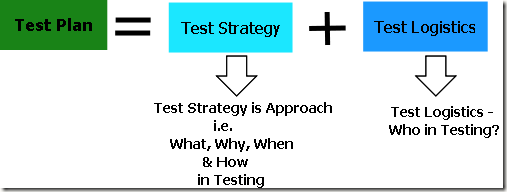
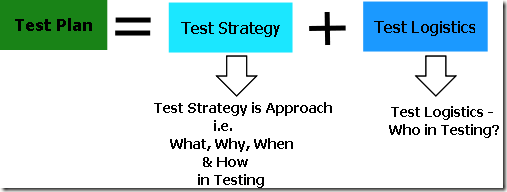
  • Test Plan: the set of ideas that guide a test project
  • Test Strategy: the set of ideas that guide test design
  • Test Logistics: the set of ideas that guide the application of resources to fulfil a test strategy

I find these ideas to be a useful jumping off point. Here are some implications:

  • The test plan is the sum of test strategy and test logistics.
  • The test plan document does not necessarily contain a test plan. This is because many test plan documents are created by people who are following templates without understanding them, or writing things to please their bosses, without knowing how to fulfil their promises, or simply because it once was a genuine test plan but now is obsolete.
  • Conversely, a genuine test plan is not necessarily documented. This is because new ideas may occur to you each day that change how you test. In my career, I have mostly operated without written test plans.

Conclusion:
Test Strategy and Test Plan Relation
Is Test Plan document is required for testing?
Test Plan covers – What needs to be tested, How testing is going to be performed? Resources needed for testing, Timelines and Risk associated.

For efficient and effective test planning we don’t really need IEEE-829 template for test plan. Planning can be done without test plan document also. Identify your test Approach (strategy) and go with your testing. Many test plans are being created just for the sake of processes.
Note – We are not against Test Plan documents. Use test plan documents if they really contains some useful information.

In the upcoming posts, we will discuss points to take care while deciding a test strategy & guide to prepare a Test Plan.
Related Posts: