Some Common Performance Testing Mistakes & their solutions


1 Incorrect Load Levels
Fix: Improve and focus communications by conducting a one-on-one interview to determine expected “real world” load levels. If the application is already in production, obtain live usage data.2 Performance Tester Identifying Key Business Processes
Fix: Conduct a one-on-one interview to identify key business processes: mission critical, heavy throughput, dynamic content, and any other business process that causes concern.
3 Too Many Business Processes
Fix: Concentrate on a few, perhaps 6-8, key business processes for performance testing – this is not a functional test.

4 Altering Load Test Objectives
Fix: Develop a complete custom plan with goal load levels, business process steps, transaction names, and acceptable response times. Analyze any missed objectives – stay consistent with the original goals unless there is a compelling reason for change.

5 Late Focus on Performance Testing
Fix: Engage the performance testing team as early as possible in the development life cycle to allow time between executions for a good analysis of the results from the performance tester. Detecting and correcting performance issues early reduces the repair cost.

6 Poor Transaction Naming Convention
Fix: For easier analysis, maintainability, future growth, and possible server consolidation, provide a clear naming convention.

7 Performance Tester Stands Alone
Fix: Let the experts do what they do best. Involve all members of the team: the DBA, Web Server Expert, Application Expert, Developer, etc. Executing a performance test is best done as a team.

8 Not Validating the Execution Transaction Levels
Fix: Validating transaction levels against the test plan after executing a full load test ensures the test presented the desired load to the application.

9 Server Experts Become Bouncy
Fix: If possible, don’t bounce the server between test executions. Bouncing the server prior to every test causes the need to rebuild the memory and cache. Memory leaks and other reliability and availability issues will be more easily identified if the server is left untouched.

10 Over-technical on Results Reporting
Fix: Performance testing creates mountains of data that are usually very interesting to technical experts. Ultimately, however, the owners of the application are looking for key performance indicators to make a sound business decision for their application go-live. Create a one-minute overview for managers that concisely conveys the critical data related to application performance.


Software Testing Latest News as of June 14, 2010

1. Malaysia aims to become major software testing hub.

Read More at: http://www.ptinews.com/news/691109_Malaysia-aims-to-become-major-software-testing-hub-

2. Microsoft confirms critical Windows XP bug.

Read More at: http://www.computerworld.com/s/article/9177966/Microsoft_confirms_critical_Windows_XP_bug

3. Study: Developers would rather do taxes than test software.

Read More at: http://news.cnet.com/8301-17852_3-20006648-71.html

4. LogiGear Breakfast Event 2010 – Test Automation is No Longer Optional.

Read More at: http://www.prweb.com/releases/2010/06/prweb4110564.htm

5. Wind River Test Management Streamlines Complex Device Testing with Run-Time Insight.Innovative Approach Helps Teams Focus Scarce Testing Resources to Achieve On-Time, On-Quality Delivery with Lower Risk.

Read More at: http://www.marketwatch.com/story/wind-river-test-management-streamlines-complex-device-testing-with-run-time-insight-2010-06-09?reflink=MW_news_stmp

6. Pesky Networking Bug Stings Twitter:

Read More at: http://www.pcworld.com/article/198442/pesky_networking_bug_stings_twitter.html

7. The Cloud is not the Limit or is it to much Software?

Read More at: http://www.suaju.com/software-news/the-cloud-is-not-the-limit-or-is-it-to-much-software/1267

Spread/Share the above news on: Facebook, Twitter

Tips for Scrum/ Sprint Planning | Agile Methodology Simplified

Tips for Scrum/ Sprint Planning | Agile Methodology Simplified

Tips for Scrum/Sprint Planning
Below are some useful tips on Agile Scrum/Sprint Planning:

During Prioritization/Planning:

    • Ensure that the real stakeholders are involve in prioritizing.
    • Don’t leave anyone behind.
    • Scrum Master &  users should be involved.

During Estimating and Planning:

    • Invite one representative of each stakeholder for about 1 hour to participate.
    • To answer any questions, we might have the issue or requirements.

When project is slipping:

    • A developer that has completed his tasks should assist in doing QA.
    • Put additional resources or ask members of the team to help so that the tasks will be completed at the end of the cycle.

A Must Read: Agile Testing Method Simplified.

Exploratory Testing (Public) Workshop in Noida (June 19, 2010) by Pradeep Soundararajan

Here is an opportunity for you to meet Pradeep in Noida (India- Delhi, NCR). Pradeep is delivering a public workshop on Exploratory testing. I am waiting for his workshop from a long time. [I already registered 🙂 and I am very excited to meet him :)]. It is a great opportunity for me to judge myself and learn new things.
For those who don’t know about Pradeep – Pradeep has played a pivotal role in inspiring testers to better their skills. He is among one of the most demanding Test Consultant.

I personally suggest that testers should attend his workshop. You can contact him through his blog http://testertested.blogspot.com/ for the workshop details and payment details.

QTP GetTOProperty, GetToProperties, SetTOProperty & GetROProperty Simplified

QTP GetTOProperty, GetToProperties, SetTOProperty & GetROProperty Simplified

Retrieving and Setting Test Object Property Values – Following are the pre-defined ways to retrieve and set values of test objects:
GetTOProperty
The GetTOProperty returns the value of the property from the test object’s description, i.e., the value used by QTP to identify the object. It returns the value of a property for a test object which QTP recorded to identify during the recording (run time).
The GetTOProperty command will retrieve the value as it was originally recorded (or created via DP). It does not matter if the corresponding runtime object exists, or if that value was updated in “the real world” since the object was recorded.
Examples:

Example 1(when object is in Object Repository):

SystemUtil.Run “iexplore.exe”
Browser(“Google”).Navigate “http://www.yahoomail.com/”
abc = Browser(“Google”).Page(“Yahoo! Mail: The best”).WebEdit(“login”).GetTOProperties (“name”)
msgbox abc

Example 2 (with descriptive programming):
Set obj = Browser(“name:=Sign in to Yahoo!”).Page(“title:=Sign in to Yahoo!”).WebEdit(“html id:=username”)
msgbox obj.GetTOProperty(“html id”)

SetTOProperty
The SetTOProperty changes the value of a test object property. Changing the property doesn’t affect the OR or Active Screen, but just the way QTP identifies the object during runtime. Actually, this changes the properties of the temporary copy of the object stored in RAM by QTP.
Any changes you make using the SetTOProperty method apply only during the course of the run session, and do not affect the values stored in the test object repository.
Example:
Set obj = Browser(“name:=Sign in to Yahoo!”).Page(“title:=Sign in to Yahoo!”).WebEdit(“html id:=username”)
msgbox obj.GetTOProperty(“html id”)
‘Would retrieve the object html id from the test object description, whether it’s in the OR or DP defined
‘Now we set the name property

obj.SetTOProperty “name”, “loginzzzzz”‘And retrieve it
msgbox obj.GetTOProperty(“name”)
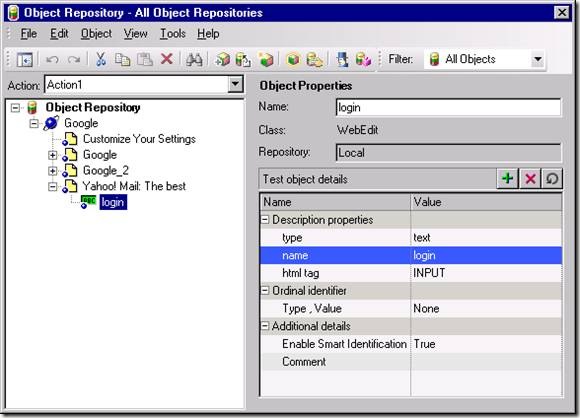
QTP Object Repository
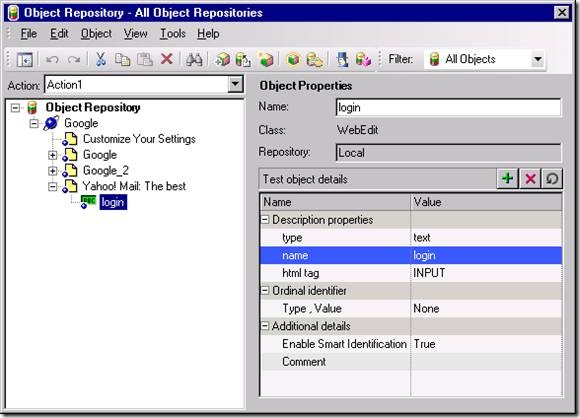
Fig: For “Login” text field, QTP captures value of name property as “login”.
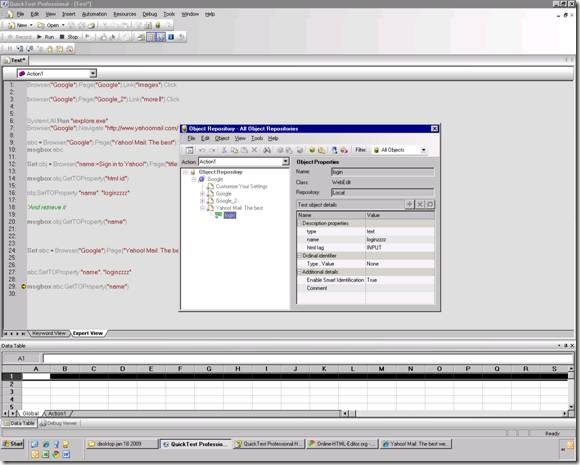
SetTOProperty changes value at Run Time in Object Repository
Fig 2: While executing the script, we use “SetToProperty” and change the value of “name” property to “loginzzzz”.
More examples:

Call Window("Notepad").SetTOProperty("nativeclass", "incorrect value") 
Window("Notepad").Close 'this command will fail

GetTOProperties:
GetTOProperties is used to enumerate all the properties of an object used for identification.
Example:
Set abc = Browser(“Google”).Page(“Yahoo! Mail: The best”).WebEdit(“login”)
Set Props = abc.GetTOProperties
PropsCount = Props.Count
For i = 0 To PropsCount – 1
PropName = Props(i).Name (.Name = Returns the name of property)
PropValue = Props(i).Value (.value = Returns the value of property)
MsgBox PropName & ” = ” & PropValue
Next
Execute the above codes in QTP, you will get the results.

GetROProperty:

GetROProperty allows us to get the current value of a test object property. This means that unlike the GetTOProperty and GetTOProperties commands, GetROProperty requires the test object’s corresponding runtime object to exist.
Basically you would use GetROProperty to get the value of an object property during runtime, such as the current list/combo item selection, or the text in a WebEdit, or the size of an object (width & height).

Print Browser("X").Page("Y"). WebList ("z").GetROProperty("selected item index")

References: http://www.advancedqtp.com & http://knowledgeinbox.com